Stream Deck Productivity
A useful next step, one key away.
Three editable Stream Deck profiles for coding, AI work and the browser. Put useful prompts, public links and a few everyday shortcuts under your hand.
 View on GitHub
- Platform
- Windows · 15-key Stream Deck
- Release
- 0.1.0-alpha.3
- License
- MIT · Fluent Emoji: MIT · Legacy Lucide: ISC
The problem
The next step is often familiar: frame a task, review a diff, recover context or make sense of a page. Rewriting the same instructions interrupts the work.
What it offers
Keep three focused profiles beside your keyboard. Choose a prompt, paste it into your AI app, add your context and send when you are ready.
Available now
Code Workflow, AI Workflow and Browser Workflow, with editable catalogs, button guides and a shared visual language. Prepared as an alpha for a Windows 15-key Stream Deck.
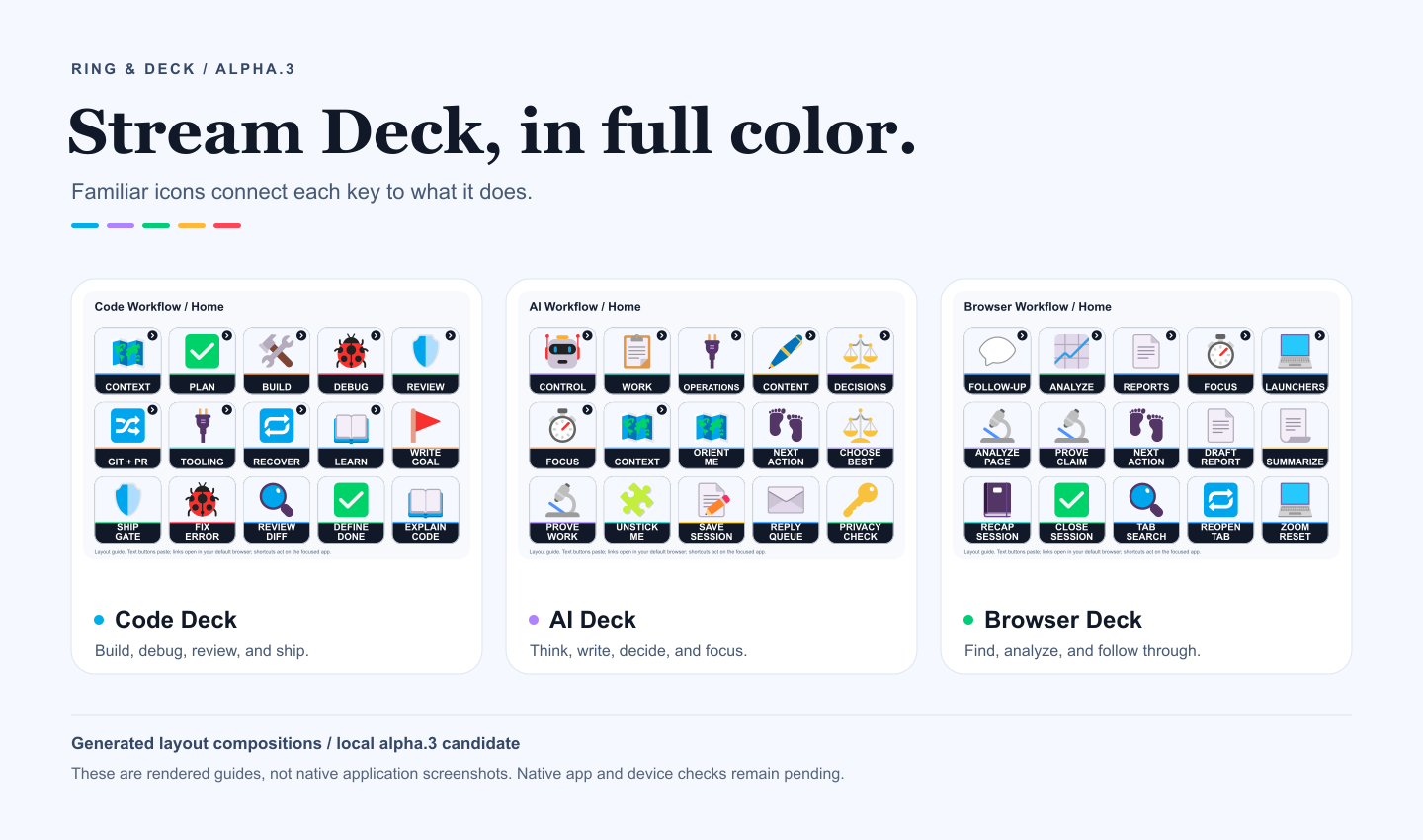
Three profiles for three kinds of work.
Colorful pictograms connect each action to something familiar: a magnifier for search, a pen for writing and a timer for focus. These previews match the published alpha.3 profiles. They are generated guides; native layout and label placement may differ.
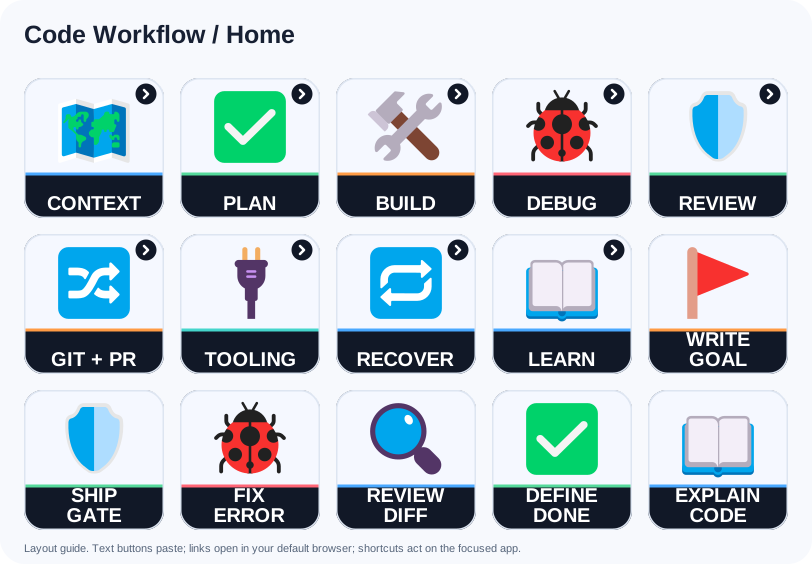
Code Workflow
83 unique prompts across 10 pages. Scope, build, debug, review, Git, tooling and recovery.
View full-size layout: Code Workflow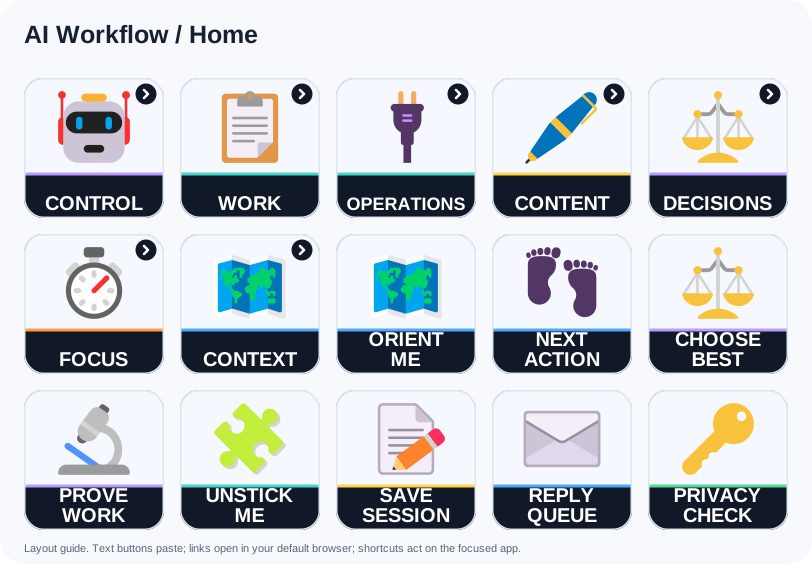
AI Workflow
51 unique prompts across 8 pages. Decisions, writing, focus, context and everyday AI work.
View full-size layout: AI Workflow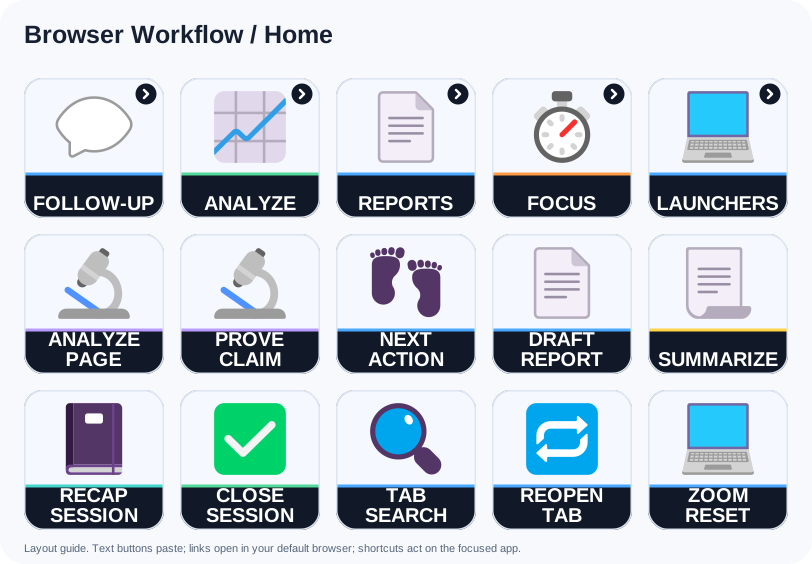
Browser Workflow
46 unique prompts, 14 public links and 3 shortcuts across 6 pages. Analysis, reports, follow-up and focus.
View full-size layout: Browser WorkflowKeep your AI app. Give it a better starting point.
These profiles paste instructions into the app you choose. They do not contain an AI model, read your browser pages or connect to an AI API. For a page-analysis prompt, supply the text or screenshot yourself, or use an assistant with browser access you have explicitly authorized.
Text keys do not press Enter. Focus the right input, activate a key, replace bracketed placeholders and review the full prompt before sending. Some prompts need tools or context your assistant may not have. A written approval instruction is guidance, not a permission system.
The prompt text and key labels are in English. You can set the requested output language in the prompt or edit the catalogs. Home shortcuts repeat selected prompts; counts are unique within each profile, not a claim that every idea is different across the collection.
Set up your first profile
- Back up your current profiles. Keep these as separate new profiles so your existing setup stays available.
- Get the matching export. The alpha packages are
code-workflow-0.1.0-alpha.3.streamDeckProfile,ai-workflow-0.1.0-alpha.3.streamDeckProfileandbrowser-workflow-0.1.0-alpha.3.streamDeckProfile. Compare downloaded files against the release'sSHA256SUMS.txt. - Import in Stream Deck profile preferences. Check the Home page's 15 keys, open each folder and use Back to return. The target grid is 5 by 3 on Windows.
- Try a blank scratch document first. Check that the full prompt appears without an extra Enter. Do not test a text key in a terminal, address bar or valuable document.
- Move to an empty AI composer. Review the pasted text, fill in your details and send manually. If an app treats multiline paste as submission, stop using text keys there.
Full setup guide · Every button explained
Browser keys behave differently
The 14 website keys open public service entry points in your default browser. They do not select a browser profile, account, workspace or tenant. Check the account that opens before working.
The 3 shortcut keys act immediately on the focused app: Tab Search (Ctrl+Shift+A), Reopen Tab (Ctrl+Shift+T) and Zoom Reset (Ctrl+0). Test them in a disposable Chrome or Edge window; other browsers may behave differently.
No API key goes in the deck
The profiles do not request, store or transmit API keys. Authentication, permissions, retention and any usage charges belong to the AI app you choose. Configure credentials only in that app's supported settings.
Catalogs and exported profiles contain readable text, settings and images. A .streamDeckProfile is a ZIP archive, not encrypted storage. Installed Stream Deck data is usually at %APPDATA%\Elgato\StreamDeck\ProfilesV3.
Pasting may replace clipboard contents. Keep keys, private client records and account details out of shared actions. The public editions remove personal paths, accounts and executable bindings from the source workflows; review anything you add before sharing it.
Alpha, with a clear boundary
The download is the published alpha.3 with the Stream Deck icon-rendering fix. A reported Windows Stream Deck 7.6 test showed pictograms and titles on all three Home pages using a virtual 15-key deck. This verifies reported configuration-UI rendering, not physical-device behavior.
Local automated checks cover package structure, references, prompt behavior and reproducible builds. Key presses, folder/Back behavior and physical-key readability still need verification. A layout guide is not evidence of a hardware test.
The target is Windows with a 15-key Stream Deck. XL, Mini, Plus, mobile layouts and macOS have not been validated. Re-imports may create duplicates; inspect the result before changing an older profile.
Validation record · Known limits
Make the workflow yours
Edit the JSON catalogs and rebuild the profiles, button guides and artwork together. Start with one prompt you use every day and adapt its wording to your work. Prompt adaptations, builder, original composition and Microsoft Fluent Emoji artwork use MIT. Legacy Lucide source drawings retain ISC. Preserve their original notices. Ring & Deck is an independent community project.
See the Ring & Deck download and setup reference for release status and future official marketplace links. Prefer a radial control? Explore the Actions Ring collection.
Try it. Inspect it. Make it yours.
Downloads, source code and issue tracking live on GitHub.
Explore more projects