Ring & Deck
Your next useful action, within reach.
Six free, editable workflow profiles for Logitech Actions Ring and a 15-key Stream Deck on Windows. Keep useful prompts and everyday controls close to your hand.

 View on GitHub
- Platform
- Windows · Actions Ring · 15-key Stream Deck
- Release
- 0.1.0-alpha.3
- License
- MIT · Fluent Emoji: MIT · Legacy Lucide: ISC
The problem
Useful AI instructions get lost in old conversations. Rewriting them and switching between small tasks interrupts the work.
What it offers
Choose a focused profile, activate an action and review the prompt in your preferred AI app. Add your context and send it yourself.
Available now
Six colorful profiles are free on GitHub in v0.1.0-alpha.3. AI Productivity Workflows is also live and free on Elgato Marketplace.
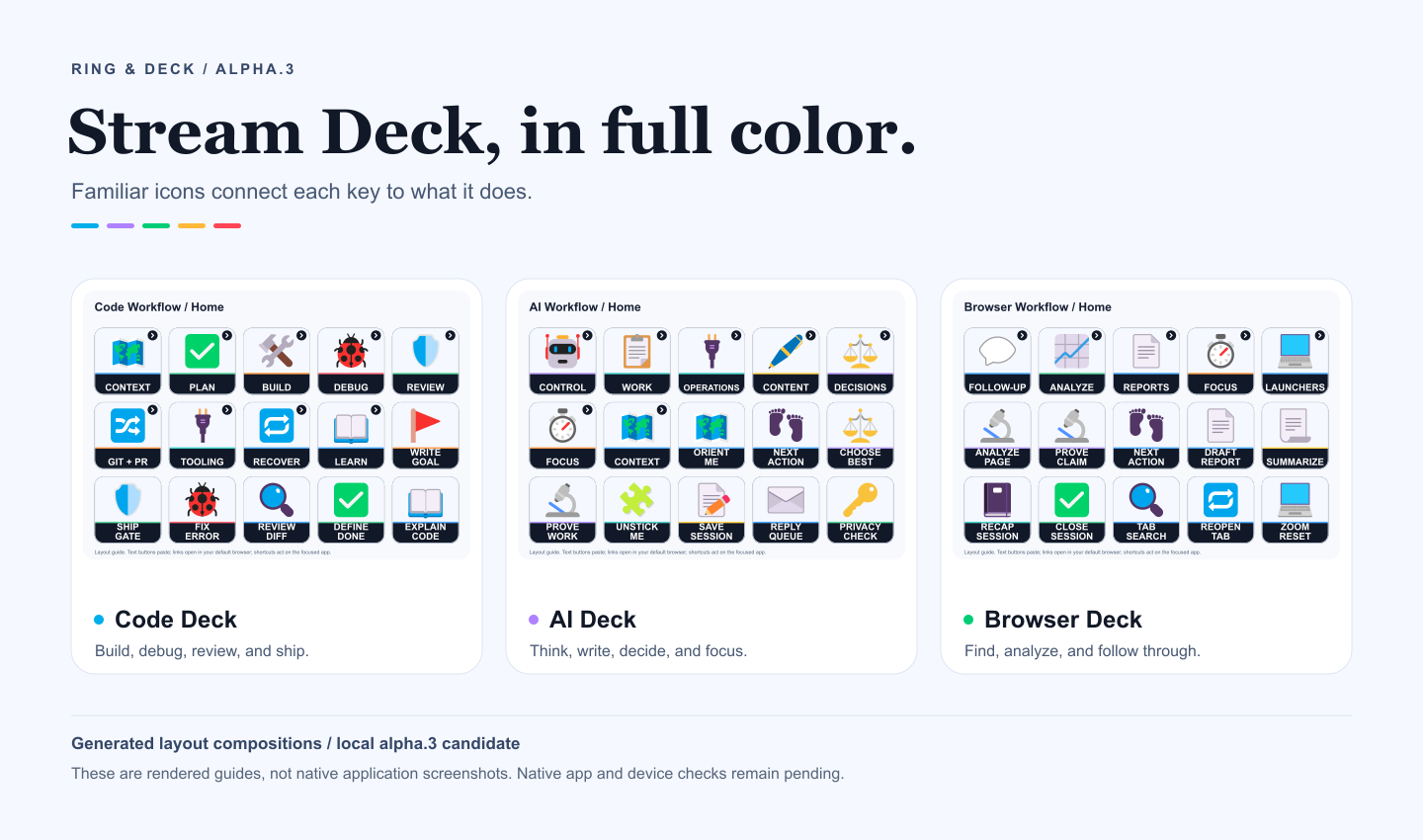
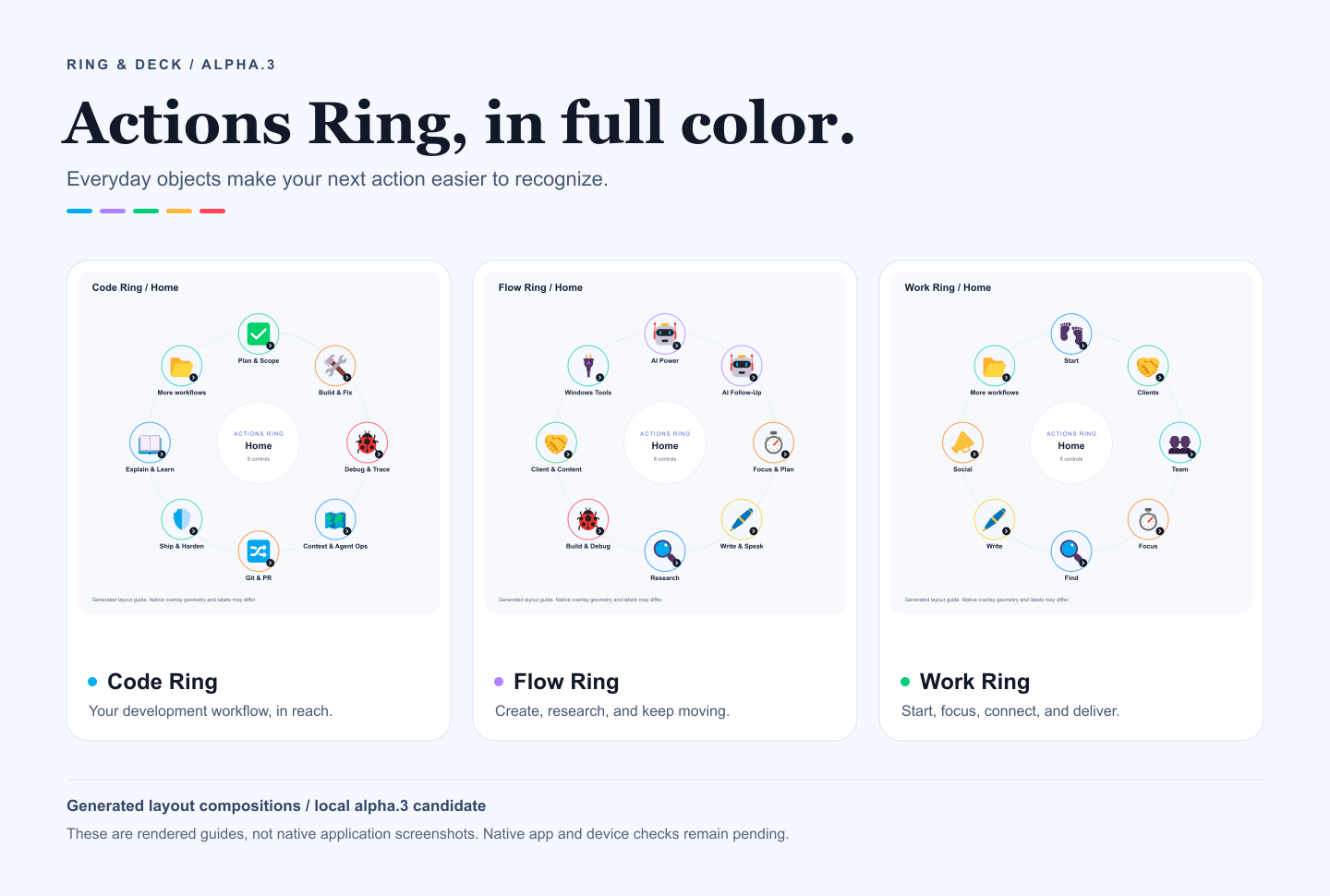
Two controls. Six focused workflows.
These generated layout previews match the colorful alpha.3 profiles available from GitHub. The layouts explain the collection; native appearance can differ.
Logitech Actions Ring
Code Ring, Work Ring and Flow Ring. Three .lp5 profiles for supported Actions Ring hardware on Windows.
View full-size layout: Logitech Actions RingAI Productivity Workflows
Code Workflow, AI Workflow and Browser Workflow. Three .streamDeckProfile files for a Windows 15-key Stream Deck.
View full-size layout: AI Productivity WorkflowsChoose the control you use
| Logitech Actions Ring | Elgato Stream Deck | |
|---|---|---|
| Profiles | Code Ring, Work Ring, Flow Ring | Code Workflow, AI Workflow, Browser Workflow |
| Target | Windows and a Logitech device that supports Actions Ring | Windows and the 15-key, 5 × 3 Stream Deck layout |
| Files | Three .lp5 files | Three .streamDeckProfile files |
| Actions | Editable prompts; Flow Ring also includes Windows shortcuts | Editable prompts; Browser Workflow also includes public links and browser shortcuts |
| Get it now | Free on GitHub | Free on GitHub |
| Official marketplace | Universal profiles are not currently accepted | Live and free on Elgato Marketplace |
The Elgato collection is named AI Productivity Workflows. Ring & Deck is an independent community project. It is not an AI plugin or a product from Logitech or Elgato. Other device layouts and macOS have not been validated.
Download the published alpha
The public v0.1.0-alpha.3 prerelease contains all six colorful profiles and the Stream Deck icon-rendering fix. Download the files for your platform and compare their SHA-256 values with the release checksum file.
Stream Deck icon fix: alpha.3 replaces the nested SVG structure associated with missing pictograms. A reported native-editor check confirmed Home icons and titles; physical-key behavior and complete navigation still need testing.
- Actions Ring:
code-ring-0.1.0-alpha.3.lp5,work-ring-0.1.0-alpha.3.lp5,flow-ring-0.1.0-alpha.3.lp5. - Stream Deck:
code-workflow-0.1.0-alpha.3.streamDeckProfile,ai-workflow-0.1.0-alpha.3.streamDeckProfile,browser-workflow-0.1.0-alpha.3.streamDeckProfile.
Download all six profiles · Open the GitHub release · Inspect the alpha.3 source · Get help or report an issue
Elgato Marketplace: Published. Download AI Productivity Workflows free from Elgato. The collection was approved on 25 September and published on 30 September 2026 as marketplace version 0.1. It contains the three alpha.3 Stream Deck profiles for Windows and the 15-key layout. Marketplace approval does not establish complete hardware validation or a partner certification.
Logitech Marketplace: not submitted. Logitech confirmed that universal .lp5 profiles are not currently supported; its profile-sharing route supports profiles tied to specific applications. The universal Actions Ring profiles remain free on GitHub. A separate compiled plugin preview is being tested locally and has not been submitted or approved.
Start with one profile
- Back up your current profiles. Import this collection as separate profiles so your everyday setup stays available.
- Choose the matching file. Import
.streamDeckProfilefiles through Stream Deck profile preferences. Import.lp5files through Actions Ring customization in Logi Options+ on supported hardware. The setup guide explains the requirements. - Inspect Home, folders and Back. Check labels and navigation before trying an action. Actions Ring may group additional categories under More.
- Try text in a blank scratch document. Text actions paste without Enter. Ring text actions wait one second before pasting. Review the entire result and clipboard behavior; do not test in a terminal, address bar or valuable document.
- Use an empty AI composer. Replace placeholders, add your context and send manually. If your app submits multiline paste automatically, stop using text actions there.
Shortcuts act immediately on the focused app. Public links open your default browser without choosing an account or browser profile. Check which app and account are active before using them.
Your AI app manages credentials
The profiles contain no AI model or API client and do not request, store or transmit API keys. Your chosen AI app manages credentials, permissions, data retention and any usage charges. The profiles are free; the app you use may charge separately.
The profiles do not read pages or grant tools access. Supply the source material yourself or use an assistant with access you have authorized. Prompts are in English and are editable. A request for approval written in a prompt is guidance, not a permission system.
Profile files are readable archives, not encrypted storage. Pasting may replace clipboard contents. Keep private credentials, client records and personal account details out of shared actions. Read the security and privacy notes.
Windows alpha: what remains untested
The published alpha.3 passed 13 automated tests and reproducible-build checks. Windows and Ubuntu CI passed, and all release downloads matched their prepared hashes. These checks do not establish native action or hardware acceptance.
A reported Windows test in Stream Deck 7.6 confirmed pictograms and titles on the Home pages of all three fixed profiles using a virtual 15-key deck. Saved local records from 24 September 2026 also confirm native-editor imports of all three alpha.3 Ring profiles, eight populated Home controls and sampled folder/editor Back checks. These editor checks do not establish physical operation. Prompt execution, complete runtime navigation, focus return, controls and physical-key readability remain unverified.
See the current validation record and known limitations. Explore the matching alpha.3 previews on the Stream Deck page and Actions Ring page.
Open source, with the original notices
Code, prompt adaptations and original compositions use MIT. The colorful Microsoft Fluent Emoji artwork retains its original MIT license. Legacy Lucide source drawings retain ISC. Preserve the applicable original notices when redistributing; no artwork has been relicensed.
Try it. Inspect it. Make it yours.
Downloads, source code and issue tracking live on GitHub.
Explore more projects