In this articleSections · 6
Executive summary
I run 16 live websites and used to open a dashboard for each one every morning. I turned the LG TV in my living room into one glanceable screen instead: two custom webOS apps installed through LG's official Developer Mode, a feed built every 10 minutes on a small home server, and a cleaned-up, ad-filtered TV. The biggest lesson was about data: GA4 behind a consent banner reported 17 users in 28 days for a site that a cookieless counter shows at more than 1,000 visitors a week.
I track 16 live websites, most of them my own brands: schools, legal tools, an invoicing product, a perfume store, a personal site. Every morning I used to open Google Analytics, Vercel, the ads consoles, my calendar and my inbox, one by one, to answer one question: how is everything doing today?
I have ADHD. For me, "go and check" is never a small thing. It is a task, and tasks stall. So I stopped trying to check more often and moved the numbers to the one screen I already look at: the 86 inch LG TV on the third floor.
It took four days with Claude Code.

What the screen shows
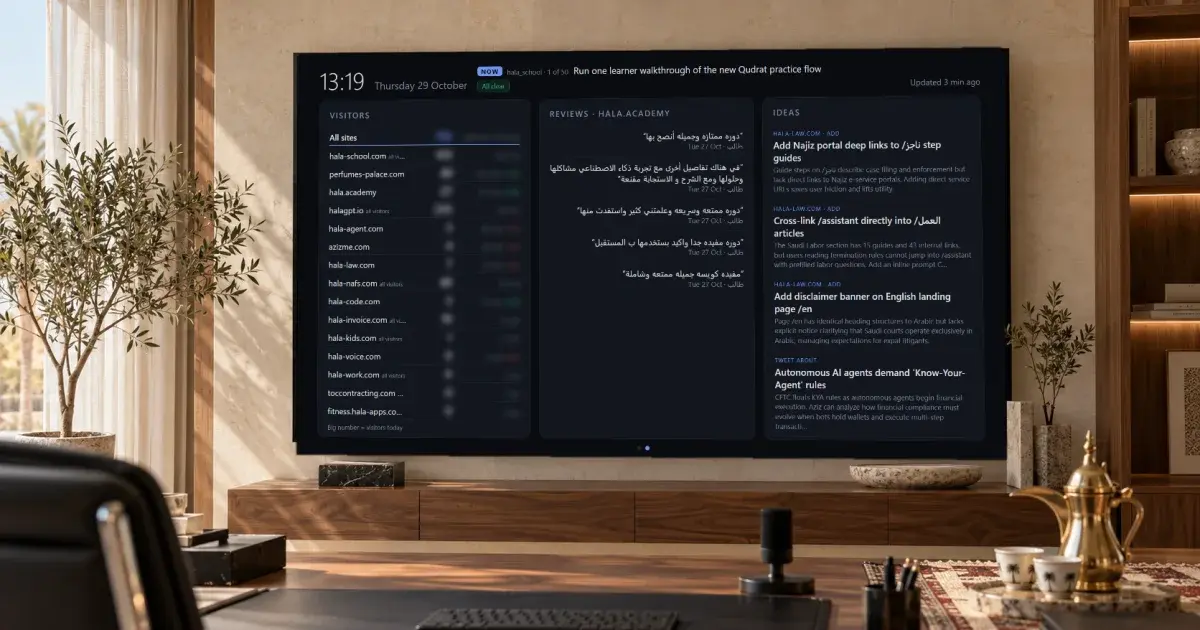
The dashboard rotates between two pages every 30 seconds.
Business: KPIs, the next meetings, a short list of important email, and the content that was published or is waiting as a draft.
Growth: visitors for every site (today, yesterday, this week, and the change from last week), the latest course reviews from hala.academy, and a list of product ideas generated from each site and the day's news.
A line at the top shows the one thing I said I would do next, pulled from my own project notes, plus red chips only when something needs me: a bad KPI, a meeting within three hours, a feed that went stale. When nothing is wrong it says "All clear", and I can keep drinking my coffee.

The rooms in these photos are AI-generated. The screen is the real dashboard, with calendar and email rows replaced by sample text and the numbers blurred.
How it works, without rooting the TV
The TV is a stock LG webOS 22 set. I did not root it and did not add a stick or a box.
- LG Developer Mode. LG's official app lets you install your own webOS apps with an LG account. The session expires, so a weekly scheduled task renews it.
- Two small apps. A dashboard and a family photo frame, both plain HTML and JavaScript packaged for webOS.
- A feed on a small home server. A Docker container rebuilds one JSON file every 10 minutes from each source: analytics, calendar, mail, the social scheduler, course reviews. Secrets come from a vault, and each source only gets its own keys.
- The TV opens it on its own. webOS 22 has no start-up app setting, so a small service watches the TV's power state and launches the dashboard about seven seconds after it turns on.
- The remote still works. Red for Business, green for Growth, yellow to pause, blue to reload.
Claude drove most of the TV setup over the home network: it can take a screenshot of the screen and press remote buttons. The first rule I wrote for it was simple: look at a screenshot before every key press. It learned why the hard way when a blind OK closed the Developer Mode app.
The analytics surprise
The best result was not the TV. It was finding out my numbers were wrong.
On hala-school.com, GA4 reported 17 users in 28 days. The site was clearly busier than that. The reason: GA4 ran behind a consent banner with consent denied by default, so it only counted the people who clicked accept.
I switched the sites where that happens to cookieless counting (Vercel Web Analytics for most, server logs for one, and a small self-hosted counter for the children's site, which gets no third-party scripts at all). The same school site now shows more than 1,000 visitors a week.
If your site has a consent banner, check what your analytics are actually counting before you make a decision from them.
Cleaning up the TV itself
While I was in there, I removed what I did not want on a family screen:
- Ads, home promotions and content recommendations turned off.
- Four promo apps removed.
- A DNS filter on the home server that blocks the TV's ad and tracking hosts, while keeping the app store working.
- The four hour auto power off turned off, so the dashboard stays up.
Privacy rules for a screen everyone can see
A TV in a shared room is a public screen. So the rules are strict:
- Email rows show sender and subject only, never the body.
- No private photos reach the photo frame.
- The dashboard is read-only. It never posts or sends anything.
What I would tell another founder
Do not build another dashboard you have to open. Put the few numbers that matter where your eyes already are. For me that was the TV. For you it might be a tablet by the door or a widget on your phone's lock screen.
Build first, explain later.
Common questions
Do you need to root an LG TV to install your own app?
No. LG's Developer Mode app lets you install your own webOS apps on a stock TV with an LG account. The session expires, so I renew it with a weekly scheduled task. Rooting was never needed.
Why do GA4 numbers look so low on some sites?
When GA4 runs behind a cookie consent banner with consent denied by default, it only counts visitors who accept. On one of my sites that meant 17 users in 28 days, while a cookieless counter showed more than 1,000 visitors a week.
Is it safe to show email on a TV in a shared room?
Only if you decide what the room can see. My dashboard shows sender and subject for a short list of important messages, never the body, and no private photos ever reach the photo frame app.